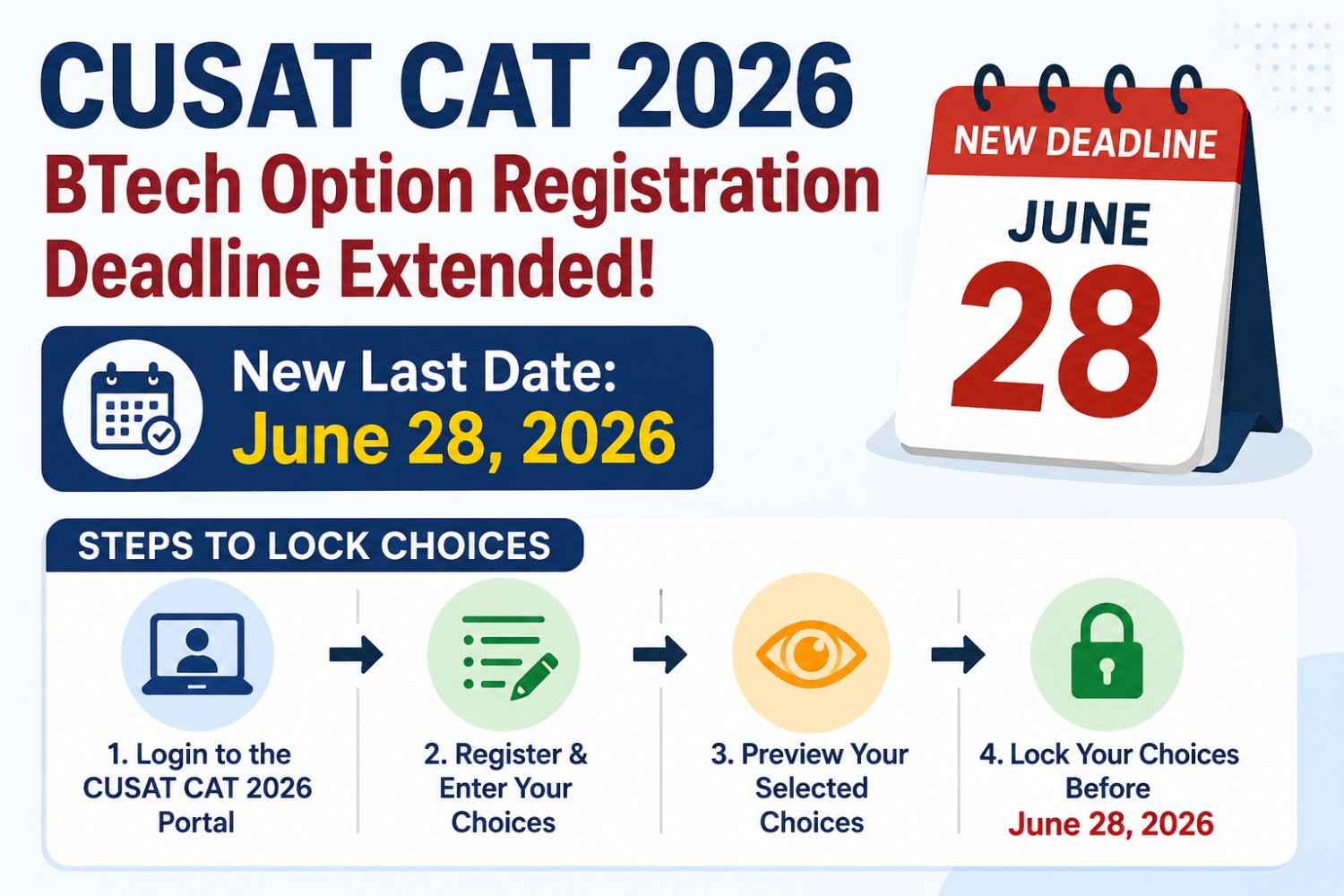

If you cleared the Cochin university of Science and Technology Common Admission Test (CUSAT CAT) 2026 and want a BTech seat at CUSAT, the option registration window is your most important step after the rank list. The university has extended the last date to submit qualifying marks and lock branch preferences to June 28, 2026. All activity happens online at admissions.cusat.ac.in.
This guide explains who must register, what changed with the deadline extension, how to fill and lock choices correctly, and what happens next in counselling and seat allotment. Whether you are a Kerala state merit candidate or applying from another state, completing option registration on time is non-negotiable—candidates who skip this step are excluded from allotment entirely.
CUSAT CAT 2026 BTech Option Registration: Key Update
CUSAT opened BTech option registration on June 16, 2026. The initial closing date was June 22, 2026. Following candidate requests and to give rank-listed students more time to verify marks and arrange preferences, the university extended the deadline to June 28, 2026.
The extension applies only to online option entry and choice locking on the official admissions portal. It does not change eligibility rules, rank calculation, or the requirement to upload qualifying examination marks before preferences are considered valid.
Important Dates at a Glance
| Event | Date |
|---|---|
| Option registration start | June 16, 2026 |
| Original last date | June 22, 2026 |
| Extended last date | June 28, 2026 |
| Official portal | admissions.cusat.ac.in |
| Mode | Online only |
Treat June 28 as a hard cutoff. CUSAT has clearly stated that the preferences stored in its database at the exact closing time will be treated as final. No email, phone call, or offline submission can replace portal-based registration.
Who Must Complete Option Registration?
Option registration is mandatory for every candidate whose name appears on the CUSAT CAT 2026 BTech rank list. Simply writing the entrance exam or receiving a scorecard is not enough—you must log in, enter Class 12 (or equivalent qualifying exam) marks, and register branch-campus combinations in order of preference.
The official notice is explicit: candidates who fail to submit qualifying marks and register options will not be considered for seat allotment under any circumstance. There is no waiting list bypass and no manual correction after the window closes.
Eligibility Checklist Before You Log In
- Your name appears on the published BTech rank list for Academic Admission 2026
- You have your CUSAT CAT 2026 login credentials (registered email and password)
- Class 12 mark sheet details are ready—Physics, Chemistry, Mathematics, and aggregate percentage
- You have reviewed eligible branches and campuses for your category (General, OBC, SC, ST, EWS, state merit, etc.)
- Personal details on the portal match your certificates; report discrepancies to the admission office before locking choices
Candidates not on the rank list cannot access the option registration module. If you are exploring backup engineering pathways while awaiting allotment results, comparing state-level entrances with national options—such as JEE Main counselling or even management entrances like the CAT exam for MBA—can help you plan parallel admission routes. Note that CUSAT CAT and MBA CAT are entirely different examinations despite the shared acronym.
Kerala students who prepared specifically for CUSAT CAT often target the university because of its strong reputation in marine, naval architecture, and core engineering disciplines. Out-of-state candidates should pay extra attention to migration certificate requirements and hostel booking timelines, which are announced separately after allotment.
Why Option Registration Matters for Seat Allotment
CUSAT BTech admission through CAT 2026 follows a centralized online counselling model. After option registration closes, the university prepares seat allotment based on three factors:
- Your CUSAT CAT rank in the relevant category
- Seat availability in each branch and campus for that category
- Your locked preference order—the system allots the highest preference you are eligible for, not necessarily your most ambitious choice
Think of option registration as building a priority ladder. If your rank qualifies you for Mechanical Engineering at the School of Engineering, Thrikkakara, but you listed Computer Science at the main campus as your first choice and that seat is already taken by higher-ranked candidates, the system moves down your list until it finds an available option or exhausts your choices.
Branches and Campuses Commonly Listed in CUSAT BTech Counselling
CUSAT offers BTech across multiple specializations. Exact seat matrix and campus mapping are published on the admissions portal and may vary by admission year. Typical programmes include:
- Computer Science and Engineering
- Electronics and Communication Engineering
- Electrical and Electronics Engineering
- Mechanical Engineering
- Civil Engineering
- Information Technology
- Marine Engineering
- Naval Architecture and Ship Building
- Polymer Science and Rubber Technology
- Safety and Fire Engineering
Campuses may include the main campus at Kochi, the School of Engineering at Thrikkakara, and department-specific centres depending on the programme. Always verify the current seat matrix on the portal before finalizing preferences—do not rely on last year's list alone.
For instance, Computer Science and Information Technology typically attract the highest rank cutoffs because of industry demand and placement visibility. Marine Engineering and Naval Architecture, while specialized, often have comparatively lower entry ranks but lead to focused career paths in shipping, offshore, and defence-related sectors. Choosing a branch based only on social popularity rather than aptitude can leave you dissatisfied even if you secure a seat—use the extension period to read programme curricula on the CUSAT website before ranking options.
Step-by-Step: How to Register and Lock BTech Options
The entire process is self-service through the candidate login area. CUSAT does not accept preferences sent by post, WhatsApp, or email. Follow each step below carefully and confirm every entry before locking.
Step 1: Access the Official Portal
Open admissions.cusat.ac.in in a desktop or mobile browser. Avoid third-party links shared on social media. Use the Candidate Login section and enter your registered email address, password, and captcha verification.
If you forgot your password, use the portal's recovery option before June 28. Admission helpline details are listed on the official website for technical issues during working hours.
Step 2: Submit Qualifying Examination Marks
After login, navigate to the section for uploading or entering qualifying exam marks. Enter Physics, Chemistry, Mathematics, and aggregate marks exactly as they appear on your Class 12 board mark sheet. Cross-check spelling of your name, board name, year of passing, and roll number.
Incorrect marks can affect eligibility verification during document scrutiny after allotment. If you have a pending revaluation result, contact the admission office immediately for guidance—do not guess marks or leave fields blank.
Step 3: Open Option Registration and Review Your Rank
Go to the BTech option registration module. The portal displays your rank, category, and eligible programmes. Download or note your rank details for reference while arranging preferences.
Confirm that reservation category, Kerala state merit status, and other labels are correct. Errors in category coding can shift you to the wrong seat matrix and reduce your chances in the intended quota.
Step 4: Add Branch-Campus Combinations in Preference Order
Add every branch-campus pair you are genuinely willing to join, starting with your top choice. CUSAT allows you to reorder preferences by dragging or using move-up/move-down controls until the deadline.
Actionable tips for smarter choice filling:
- Include at least 8–12 combinations if you are eligible for that many—limited lists increase the risk of no allotment
- Place realistic options in the middle of your list, not only dream branches at the top and nothing else below
- Separate campus preference matters: the same branch at Thrikkakara and at another centre may have different cutoffs
- Research syllabus, placement trends, and hostel availability for each programme—not just branch name popularity
- Discuss choices with teachers or seniors who know CUSAT's previous year closing ranks for your category
Step 5: Save, Review, and Lock Your Choices
Save your preference list and review the complete order from first to last option. When satisfied, use the Lock Choices button to finalize. Some systems auto-lock preferences if you fail to lock manually before the deadline—however, you should never depend on auto-lock. Confirm the locked status message and take a screenshot or printout.
You may edit and rearrange options any number of times until 11:59 PM on June 28, 2026 (or the exact time stated in the official notification). After closure, the database snapshot is final and cannot be changed for any reason.
Common Mistakes Candidates Should Avoid
Every counselling season, a significant number of rank-listed students miss allotment not because of low rank but because of procedural errors. Avoid these pitfalls:
- Missing the extended deadline—calendar reminders for June 27 and June 28 morning are essential
- Entering wrong Class 12 marks—double-entry verification prevents disqualification at document verification
- Listing too few options—a three-choice list is risky when competition is high in popular branches
- Assuming higher rank guarantees top branch—allotment depends on category-wise seat pool and choices of other candidates
- Not locking choices—always manually lock and verify confirmation on screen
- Using shared or public computers without logging out—protect your login credentials
- Ignoring category-specific seat rules—Kerala state merit and other quotas follow separate matrices
What Happens After June 28, 2026?
Once option registration closes, CUSAT will process first-round seat allotment. Expected subsequent steps in the counselling cycle include:
- Publication of seat allotment result on admissions.cusat.ac.in
- Seat acceptance by allotted candidates within the prescribed timeline
- Fee payment to confirm the provisional seat
- Reporting to the allotted institute with original documents for verification
- Further rounds including spot allotment if seats remain vacant after withdrawals
Documents Typically Required After Allotment
Keep these ready in both original and photocopy form. The exact list may be updated in the official counselling letter:
- CUSAT CAT 2026 admit card and scorecard
- Application registration confirmation page
- Counselling or allotment letter downloaded from the portal
- Class 10 and Class 12 mark sheets and passing certificates
- Transfer certificate and conduct/character certificate from the last institution attended
- Migration certificate (for candidates from outside Kerala, if applicable)
- Category certificate and Kerala state status proof, if applicable
- Passport-size photographs
- Proof of fee payment
Candidates allotted seats must report within the stipulated period. Failure to accept, pay fees, or verify documents can lead to cancellation and the seat being offered to another candidate in subsequent rounds.
Fee structures for CUSAT BTech programmes vary by branch and category. Approximate total programme fees range from roughly INR 1.5 lakh to INR 3 lakh across specializations, though exact amounts for Academic Admission 2026 will be listed in the allotment letter and official fee notification. Budget not only tuition but also hostel deposit, caution money, and semester-wise charges when deciding whether to accept an allotted seat.
If you decline an allotted seat or fail to complete acceptance formalities, you may become eligible for subsequent counselling rounds depending on university rules. However, each round compresses available choices—students who lock a broad, well-researched preference list in the first round usually fare better than those who gamble on later spot rounds alone.
Planning Backup Options While You Wait for CUSAT Allotment
Even with a good CUSAT CAT rank, prudent students keep parallel plans active until a seat is confirmed. Engineering admissions across India move on different timelines—JEE Main counselling, state CETs, and deemed university processes may overlap with CUSAT's schedule.
If you are also considering institutions outside Kerala, research accredited programmes carefully. For example, students looking at Rajasthan often explore coaching-hub colleges such as MD Mission College Kota alongside their primary choices. In Tamil Nadu, campuses like Vel Tech Chennai and DMI College of Engineering Chennai represent the kind of alternatives candidates compare on fees, placements, and location before committing to a single path.
Backup planning does not mean losing focus on CUSAT—it means you are prepared if your preferred branch-campus combination is not allotted in early rounds. Complete your CUSAT option registration first; treat every other application as supplementary until you have a confirmed seat.
Expert Tips to Maximize Your Allotment Chances
Rank is fixed, but how you fill options still influences outcomes within your rank band. Apply these practical strategies before you lock on June 28:
- Study previous year closing ranks for your category in each branch—CUSAT publishes historical data or candidates share verified lists on official forums
- Balance ambition and safety—place one or two reach options at the top, several target options in the middle, and at least two safe options at the bottom
- Consider niche branches—programmes like Naval Architecture or Polymer Technology may offer strong careers with lower rank cutoffs than Computer Science
- Verify hostel and transport—campus location affects daily cost and commute, especially for out-of-state students
- Re-login before the deadline—check on June 28 that marks are saved, choices appear in the correct order, and lock status shows confirmed
- Keep phone and email active—allotment alerts and fee deadlines arrive through official communication channels
How CUSAT CAT 2026 BTech Counselling Differs From Other Entrance Exams
Indian students often juggle multiple entrance tests. Clarity on how each process works prevents missed deadlines:
| Aspect | CUSAT CAT 2026 BTech | Other Exams (e.g., JEE Main, State CETs) |
|---|---|---|
| Conducting body | Cochin University of Science and Technology | NTA, state agencies, or private universities |
| Scope | Primarily CUSAT campuses and affiliated BTech seats | National or state-wide participating institutes |
| Option entry portal | admissions.cusat.ac.in | JoSAA, state counselling portals, or institute -specific systems |
| Mark submission | Mandatory during option registration | Varies—some require marks only at document verification |
| Extended deadlines | June 28, 2026 for current BTech round | Depends on respective counselling authority |
CUSAT CAT should not be confused with the Common Admission Test used for MBA admissions—the latter is a separate national exam. Understanding that distinction helps when searching resources and avoiding wrong login portals.
JEE Main scores are also accepted for certain CUSAT BTech admission routes in some years alongside CAT ranks—check the Academic Admission 2026 information brochure on the portal for the exact weightage and eligibility clauses applicable to your application category. Students who appeared in both exams should confirm which score the rank list reflects before prioritizing branches.
Technical Troubleshooting During Option Registration
Portal slowdowns are common near deadlines. If you face login errors, clear browser cache, disable VPN, switch to a stable broadband connection, or try an alternate browser. Complete registration at least 24 hours before June 28 to avoid last-minute server congestion. Screenshot every confirmation page. If marks fail to save despite repeated attempts, contact the CUSAT admission helpdesk using the phone numbers and email IDs published on admissions.cusat.ac.in rather than waiting until the final hour.
Conclusion
The extension of CUSAT CAT 2026 BTech option registration to June 28, 2026 gives rank-listed candidates a final opportunity to upload qualifying marks and lock branch-campus preferences at admissions.cusat.ac.in. The process is straightforward—login, enter marks, arrange choices, lock, and print confirmation—but the consequences of skipping it are absolute exclusion from seat allotment.
Use the remaining days to research programmes, widen your preference list with realistic options, and verify every detail on the portal. Allotment will follow your rank, category, and the order in which you locked your choices. Complete registration on time, keep documents ready for verification, and maintain backup admission plans until your CUSAT seat is officially confirmed. That disciplined approach turns a strong entrance exam performance into an actual engineering seat at one of Kerala's premier technology universities.